



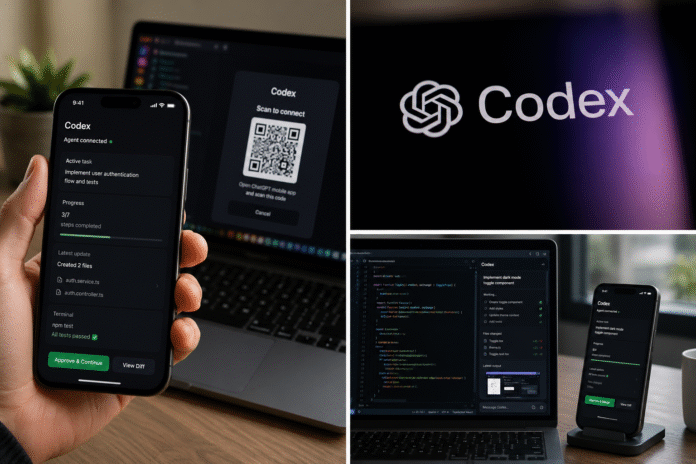
OpenAI just made its most aggressive move yet in the AI coding agent war. Codex, the company’s flagship AI coding assistant, is now accessible directly from the ChatGPT mobile app on both iOS and Android. The update, announced on May 14, 2026, means developers can monitor, approve, and steer their AI coding agents from anywhere, no laptop required.
This isn’t a watered-down mobile version. It’s the full Codex experience. Your code, credentials, and project context stay safely on your machine. Only real-time updates stream to your phone through a secure relay.
What Is OpenAI Codex?
For those unfamiliar, Codex is OpenAI’s AI-powered coding agent designed to handle end-to-end software development tasks. Think of it as a tireless junior developer that can write features, fix bugs, refactor codebases, run tests, and even submit pull requests, all from a natural language prompt.
Powered by OpenAI’s frontier coding models (currently GPT-5.3-Codex), the tool has seen explosive growth throughout 2026. According to OpenAI, more than 4 million people now use Codex every week. Enterprise adoption has accelerated alongside individual usage, with companies integrating the tool into real production workflows.
The Codex app is available as a standalone desktop application on macOS and Windows, a CLI tool, and an IDE extension for VS Code. And now, mobile.
What’s New: Codex in the ChatGPT Mobile App
The mobile integration is rolling out as a preview across all ChatGPT plans, including Free and Go tiers, in all supported regions. That’s a notable decision. OpenAI isn’t gatekeeping mobile access behind a paywall. Every ChatGPT user can try it.
Here’s how it works in practice:
- Open the ChatGPT app on your iPhone, iPad, or Android device
- Scan a QR code displayed by the Codex desktop app on your Mac
- Your phone connects to your active Codex environment via a secure relay layer
- All your threads, projects, and context sync in real time
Once connected, your phone becomes a remote command center. You can:
- Start new coding tasks
- Review outputs including screenshots, terminal logs, and code diffs
- Approve or reject commands the agent wants to execute
- Change the AI model being used mid-task
- Steer active threads with follow-up instructions
Your files and credentials never leave your machine. The secure relay only transmits updates, diffs, and approval requests. OpenAI designed the architecture so that trusted machines stay reachable across devices without direct public internet exposure.
One important clarification that has confused some users online: this is not a standalone Codex mobile app. You won’t find “Codex” as a separate download in the App Store or Google Play. The mobile experience lives entirely inside the existing ChatGPT app.

What You Can and Can’t Do From Your Phone
The mobile integration is genuinely powerful for a phone-based experience, but it’s worth setting realistic expectations.
What works well from mobile:
- Quick check-ins on long-running tasks
- Approving agent actions while commuting or grabbing coffee
- Starting a new task while an idea is fresh in your mind
- Reviewing code diffs and test results
- Responding to decision points where Codex needs human input
Current limitations:
- You’re not writing code on your phone. This is a monitoring, steering, and approval interface, not a mobile IDE
- Windows support isn’t ready yet. The phone-to-desktop connection currently works only with Codex on macOS. Windows is coming soon
- Small screen risks are real. Approving code changes on a 6-inch display is inherently riskier than reviewing on a 27-inch monitor. As Axios reported, approving agents on your phone could lead to greater risk for errors when users are multitasking
Why This Matters: The AI Coding Agent Race Goes Mobile
This launch doesn’t exist in a vacuum. OpenAI and Anthropic are locked in an increasingly intense competition over who will own the AI coding agent market.=
The race is also expanding beyond pure coding agents. xAI is pushing Grok toward more customizable AI workflows, a direction we covered in our breakdown of Grok as a custom AI workflow tool.
Anthropic’s Claude Code has offered mobile access since fall 2025, giving it a head start. According to TechCrunch, the rapid feature releases from both companies highlight the tense competition over whose agentic coding tool will become the most widely used.
Here’s how the two mobile experiences currently stack up:
| Feature | Codex Mobile (May 2026) | Claude Code Mobile |
| Access method | Inside ChatGPT app | Inside Claude app |
| Platforms | iOS, iPad, Android | iOS, Android |
| Available plans | All including Free | All tiers |
| Start new tasks | Yes | Yes |
| Review and approve outputs | Yes | Yes |
| Remote computer use | Yes (macOS) | No |
| Windows host support | Coming soon | N/A (terminal-based) |
The key differentiator right now is Codex’s Computer Use capability. The Codex desktop app can operate macOS applications directly, including clicking, typing, and navigating UIs. That means the mobile integration lets you remotely supervise tasks that go beyond pure code. Testing frontends, interacting with web apps, or working inside tools without an API are all on the table. Claude Code doesn’t offer this yet.
On the flip side, Claude Code’s Agent Teams feature gives it an edge in complex scenarios. It allows multiple sub-agents to coordinate with shared task lists, which is powerful for large multi-file refactoring. The tools are converging, but they’re getting there from different directions.

The Bigger Picture: Mobile-First AI Agents Are Becoming the Norm
This launch signals something bigger than just a feature update. AI coding agents are shifting from desktop-only power tools to cross-device platforms that follow you everywhere.
As AI agents become more autonomous and embedded across devices, the governance debate is also getting louder. OpenAI has already called for a global AI governance body to help coordinate oversight as these systems become more capable.
Consider the timeline of Codex’s evolution:
- May 2025: Codex launches as a cloud-only feature inside ChatGPT
- June 2025: Codex CLI goes open source, rewritten in Rust for performance
- February 2026: Codex desktop app launches on macOS
- March 2026: Windows support arrives
- April 2026: Computer Use, image generation, 90+ plugins, and in-app browser
- May 2026: Mobile access via ChatGPT
In less than 12 months, Codex went from a sidebar feature to a cross-platform command center spanning desktop, terminal, IDE, browser extension, and now mobile. No other AI coding tool has expanded across this many surfaces this quickly.
The growth numbers back this up. According to Neowin, Codex reportedly added 1 million weekly active users in just two weeks during late April 2026. Enterprises like Virgin Atlantic, Cisco, Notion, and Rakuten are already integrating Codex into production workflows. OpenAI has also partnered with consulting firms including Accenture, Capgemini, and PwC through its new Codex Labs program to speed up enterprise rollout.
The implication for developers is clear. AI coding agents are no longer tools you sit down to use. They’re background processes that keep working while you step away. Mobile access means you never truly disconnect from your codebase. Whether that’s empowering or anxiety-inducing probably depends on your relationship with work-life boundaries.
How to Get Started With Codex on Mobile
Setting up the mobile experience takes only a few steps:
- Update the ChatGPT app to the latest version on your iPhone, iPad, or Android device
- Update the Codex desktop app on your Mac to the latest release
- Open Codex on your Mac and look for the mobile pairing option
- Scan the QR code from the ChatGPT mobile app
- Start working across your threads and projects from your phone
You’ll need an active ChatGPT account on any plan. If you’re new to Codex entirely, you’ll also want to set up at least one project folder on your desktop first.
FAQ
Q1. Is there a standalone Codex mobile app?
No. Codex mobile access is built into the ChatGPT app for iOS and Android. There is no separate Codex app to download on your phone.
Q2. Does Codex mobile work on Windows? Not yet. The mobile-to-desktop connection currently supports macOS only. OpenAI has confirmed Windows support is coming soon.
Q3. Is Codex mobile free?
Yes. The mobile preview is available on all ChatGPT plans, including Free and Go. Higher-tier plans (Plus, Pro, Business, Enterprise) offer increased rate limits and additional features.
Q4. Can I write code directly on my phone with Codex?
No. The mobile experience is designed for monitoring, approving, and steering active Codex tasks. Your code runs on your desktop machine or remote environment. Think of it as a remote control, not a mobile IDE.
Q5. Is my code safe when using Codex from my phone?
Your files, credentials, and permissions stay on the machine where Codex is running. The mobile connection uses a secure relay layer that syncs updates without exposing your machine to the public internet.
Q6. How does Codex mobile compare to Claude Code mobile?
Both let you monitor and manage AI coding tasks from your phone. Codex currently has an advantage with Computer Use (remote control of desktop apps), while Claude Code offers more sophisticated multi-agent coordination through its Agent Teams feature. Both are available on all plan tiers.
The post OpenAI Codex Mobile App: AI Coding Agent Now Available on iOS and Android via ChatGPT appeared first on Memeburn.