


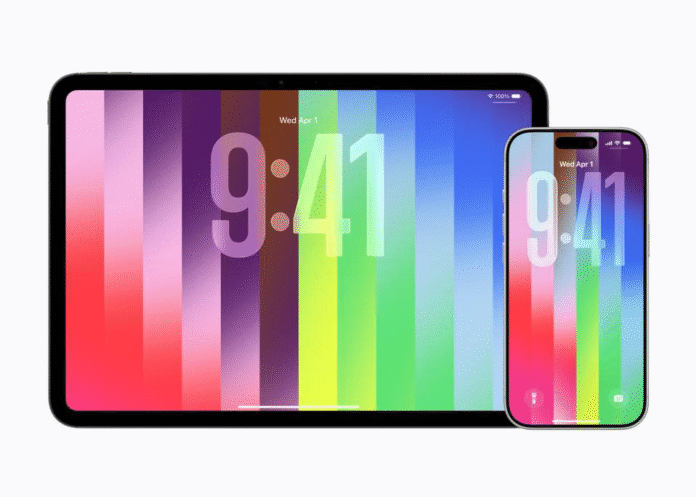
Apple has just released iOS 26.5, and with it comes one of the most customizable wallpaper options the company has ever offered. The new Pride Luminance wallpaper transforms your iPhone screen with dynamic strips of color that shift and refract as you interact with your device. Whether you are looking for a fresh way to change your iPhone wallpaper or want to explore deeper iPhone lock screen customization, this update delivers on both fronts.
The wallpaper arrived as part of Apple’s broader 2026 Pride Collection, which also includes a new Apple Watch band and a matching watch face. But what makes this wallpaper iPhone users will love is the sheer level of personalization it puts in your hands.
What Is the Pride Luminance Wallpaper?
Apple’s new Pride Luminance wallpaper features colorful moving shapes that shift as you interact with your device. The colors transition smoothly as you swipe up from the lock screen to the home screen, and the wallpaper also changes dynamically when users move, lock, or unlock their iPhone. By default, it uses a rich palette inspired by the LGBTQ+ community, but Apple designed it to be far more versatile.
The wallpaper comes with 11 preset color variations and a fully custom option that lets you pick up to 12 individual colors, making it one of the most personalized iPhone wallpaper experiences Apple has ever released. Each preset draws inspiration from different community flags, but the custom builder opens the door for anyone to create something unique. You can go with autumnal earth tones, cool monochromatic grays, or bold neon combinations.
The wallpaper was also designed to complement the Liquid Glass interface from iOS 26, so the translucent layers blend naturally with the updated system design.

How to Change iPhone Wallpaper to Pride Luminance
Before anything else, make sure your device is running iOS 26.5.
- Open the Settings app, go to General, then tap Software Update.
- Once updated, open Settings, tap Wallpaper, then choose Add New Wallpaper.

Source: Foundry
Scroll down to the Pride section and select the new Pride Luminance wallpaper. From there, you can swipe left or right to preview all 11 built-in presets. If you want to customize it with your own colors, swipe until you find “Custom” at the bottom of the list.

Source: Foundry
To create your own color palette, tap the pencil icon in the Custom view to open the color picker. You can select up to 12 different colors in any combination. Once you are done customizing, swipe down to close the color picker, then tap Add and Set as Wallpaper Pair to make it your current wallpaper.

Source: Foundry
Beyond the colors, you can also customize the widgets on your lock screen and adjust the clock appearance. The wallpaper uses the iOS 26 large glassy font by default, but tapping the time panel lets you change the font style and color. This makes the entire iPhone lock screen customization process feel genuinely creative.
Add a Matching Watch Face on Apple Watch
If you own an Apple Watch, you can install the matching Pride Luminance watch face by updating to watchOS 26.5. Open the Watch app on your iPhone, go to the Face Gallery tab, and scroll to the Pride Collection. Choose your favorite style, customize it, then tap Add to Watch.
The face features two geometric patterns: a radial design where color rays align with hour marks, and a vertical layout mirroring the wallpaper’s stripes. You can also pick your own palette of up to 12 colors, just like the iPhone wallpaper. The result is a cohesive look across both your iPhone and Apple Watch.

Source: Foundry
The 2026 Pride Collection
The wallpaper is part of Apple’s annual Pride tradition. This year’s collection also features the Pride Edition Sport Loop, a band woven from 11 colors of nylon yarns that blend into each other, creating depth and motion across the band. It is priced at $49 and available in 40mm, 42mm, and 46mm sizes.
Apple has stated that it financially supports organizations serving LGBTQ+ communities as part of this annual commitment. Previous years’ Pride wallpapers and watch faces remain available across iPhone, iPad, and Apple Watch, so if you missed an earlier design, you can still download it from the gallery.
Other iOS 26.5 Features Worth Knowing
The wallpaper is not the only reason to update. iOS 26.5 also brings end-to-end encrypted RCS messaging in beta, adding a new security layer to cross-platform conversations between iPhone and Android. Encrypted chats display a lock icon so users can verify their messages are protected.
The update also introduces Suggested Places in Apple Maps, which displays recommendations based on trending locations and your recent searches. Looking further ahead, Apple is expected to unveil iOS 27 at WWDC 2026 on June 8, which will bring the next major wave of features later this fall.
Why This Update Matters for iPhone Personalization
With dynamic animation, Liquid Glass integration, and a 12-color custom builder, the Pride Luminance wallpaper is arguably the most customizable wallpaper Apple has ever shipped for the iPhone. Apple has steadily expanded the customization toolkit since iOS 16 introduced the lock screen editor, and this release represents another meaningful step forward.
If you have been wanting to refresh your iPhone screen or explore what the lock screen editor can actually do, iOS 26.5 and the Pride Luminance wallpaper are well worth the update. Whether you keep the default rainbow palette or craft something entirely original, the result is a lock screen that feels personal and alive.
Apple’s push into personalization may also connect with its broader AI hardware plans, including reports that Apple AI AirPods with cameras could help Siri better understand a user’s surroundings.
The post Apple’s New iPhone Wallpaper in iOS 26.5: How to Customize the Pride Luminance Lock Screen appeared first on Memeburn.