


Apple just shipped iOS 26.5, and the headline feature is the one most of us assumed would never happen: text messages between iPhone and Android phones are now end-to-end encrypted by default. For years, the gap between blue-bubble iMessage chats (private) and green-bubble cross-platform chats (not private) was the most-talked-about privacy hole in mainstream messaging. Here’s what changed, what it actually protects, and what you need to check on your phone today.
What “encrypted RCS iPhone to Android” actually means
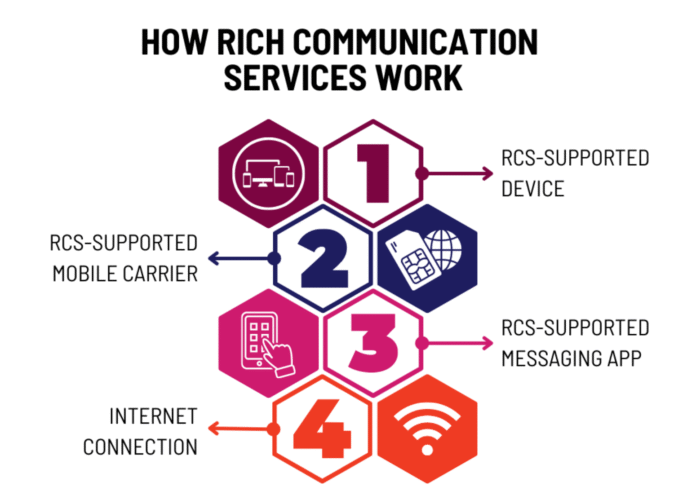
RCS stands for Rich Communication Services. It’s the modern replacement for traditional SMS — the upgrade that gave you typing indicators, read receipts, and higher-quality photos when you text someone on a different brand of phone.

Apple added RCS to iPhone in 2024 with iOS 18, but until this week, those messages travelled across carrier networks without any cryptographic protection.
End-to-end encryption (E2EE) is the standard used by iMessage, WhatsApp, and Signal. In plain: only you and the person you’re texting can read what’s sent. When RCS messages are end-to-end encrypted, they can’t be read while they’re sent between devices. Your carrier, Apple, Google, and anyone listening on the network in between all see scrambled output instead of the real text.

That’s the gap iOS 26.5 closes — and it’s why this matters even if you’ve never paid attention to RCS before.
How Apple and Google finally agreed on this
The fix isn’t an Apple-only feature. It needed both sides of the messaging world — and the carriers — to sign onto the same standard. Apple and Google worked through the GSM Association, the global body that manages mobile network specs, to publish a new version of the RCS standard called Universal Profile 3.0. The encryption itself is built on Messaging Layer Security, an open protocol designed for group chats and cross-platform secure messaging.

GSMA’s chief technology officer, Alex Sinclair, framed it as a milestone for open standards rather than a vendor win. Sinclair said, “This welcome progress is the result of close, cross‑industry collaboration between the GSMA RCS Working Group, including Apple, Google, and the wider mobile ecosystem. Crucially, the new secure services are being delivered on an open, globally recognised foundation.”
We’ve watched these two companies argue about cross-platform messaging for years. The fact that they shipped something together — and shipped it without paid-tier gates or hardware lock-ins — is genuinely unusual.
What you’ll see on your phone
If you’ve updated to iOS 26.5, open the Messages app and look at a chat with an Android friend. The iOS Messages app will show “Text Message · RCS | [lock icon] Encrypted” at the centre of the screen.

No lock icon? The feature hasn’t rolled out to that thread yet. Your friend on Android will see the same lock icon inside Google Messages — Google has used the same symbol for Android-to-Android encrypted chats for years.
You don’t have to flip a switch. Encryption is enabled by default. You can toggle it on or off by going to Settings > Messages > RCS Messaging and looking for the new End-to-End Encryption (Beta) toggle. The “beta” label is misleading — it’s shipping to everyone, but Apple wants the option to fix anything that breaks during the wider rollout.
Carrier support is the real catch. For both ends of a chat to be encrypted, both your carrier and your friend’s carrier need to support the new RCS Universal Profile 3.0.
In the US, Apple lists most major networks as ready — AT&T, T-Mobile, Verizon, Boost, Cricket, Mint, Spectrum, US Cellular, and others. Internationally, the list is shorter and growing. We’d expect most major Western European, Canadian, and Australian carriers to clear it over the next few months.
Why does this land at an interesting moment
Mainstream messaging security keeps getting stress-tested. AI is making vulnerability discovery faster, and attackers are using it to find new ways into accounts and apps that used to be considered safe. Just this week, Google’s Threat Intelligence Group revealed the first confirmed case of hackers using AI to build a 2FA bypass exploit — a tool designed to walk straight past two-factor authentication on a widely used admin platform.

The takeaway from both stories is the same: the layer of trust your messages and accounts sit on is getting more contested, not less.
Default encryption on RCS doesn’t fix everything — your messages are still readable on whichever phones you and your friend use, and a stolen phone is still a stolen phone. But it does remove one of the most boring, most exploitable weaknesses in everyday communication: messages travelling in plaintext across a carrier’s network.
What’s still missing
Encryption is the headline, but the cross-platform RCS experience still isn’t fully on par with iMessage.
Editing sent messages, undo send, and higher-resolution media sharing are part of RCS Universal Profile 3.1 and 4.0 — and most of those aren’t lit up yet.
iOS 26.5 also won’t help you if either you or the person you’re texting is on an older device, an older app version, or a carrier that hasn’t joined the new profile.
iOS 26.5 also patches over 50 separate security vulnerabilities elsewhere in the operating system — covering WebKit, the kernel, image processing, and more. If you’ve been putting off updating, this is a good week to stop putting it off.
The bottom line
For a feature that took two years and a global standards body to ship, “encrypted RCS iPhone to Android” lands quietly. There’s no big banner in the Messages app, no setup flow, no marketing push. You install the update, you see a lock icon, and you carry on.
That’s the right design — secure-by-default messaging shouldn’t ask the user to opt in. But it’s also worth pausing for a second to notice what just happened: the biggest unencrypted slice of mainstream consumer messaging just got closed, almost in the background.
If you’re on an iPhone, update to iOS 26.5 today. If your friends are on Android, tell them to update Google Messages. The lock icon does the rest.
The post Encrypted RCS iPhone to Android: What iOS 26.5 Fixes appeared first on Memeburn.